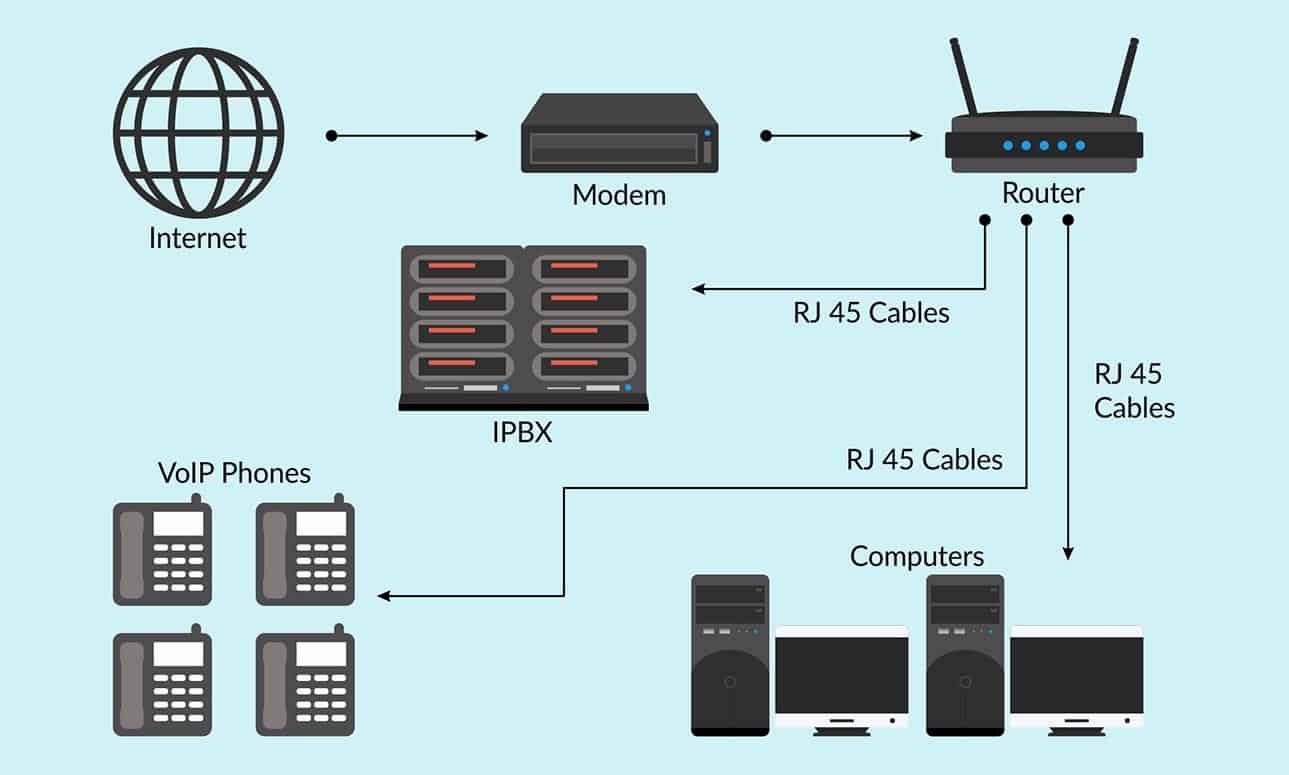
VoIP, which stands for Voice over Internet Protocol, is a technology that allows you to make voice calls over the internet instead of using traditional telephone lines. VoIP has become increasingly popular for office communications due to its cost-effectiveness, flexibility, and the range of features it offers. Here's some information about setting up a VoIP office:
Choose a VoIP Service Provider: There are many VoIP service providers to choose from, such as RingCentral, Vonage, 8x8, and Zoom Phone. Research and compare providers to find the one that best suits your office's needs, including pricing, features, and customer support.
Select the Right Equipment: You'll need VoIP-compatible phones or headsets for your office. Some VoIP providers offer their own hardware, while others allow you to use third-party devices. Ensure that your equipment is compatible with your chosen VoIP service.
Internet Connection: A stable and high-speed internet connection is crucial for VoIP. Make sure your office's internet connection can handle the bandwidth required for VoIP calls, especially if you have multiple users making calls simultaneously.
Install and Configure: Install the VoIP phones or software and configure them according to your provider's instructions. You'll need to set up extensions, voicemail, call routing, and other features.
Features and Integration: VoIP systems often come with various features like call forwarding, call recording, voicemail to email, and video conferencing. Customize these features to fit your office's needs.
Security: VoIP systems are vulnerable to security threats like hacking and eavesdropping. Implement security measures like strong passwords, encryption, and firewalls to protect your VoIP network.
Training: Provide training to your staff on how to use the VoIP system effectively. Ensure they are aware of features like transferring calls, setting up conference calls, and using voicemail.
Scalability: Consider the future growth of your office. Choose a VoIP system that can easily scale with your business without significant disruptions.
Quality of Service (QoS): Set up Quality of Service on your network to prioritize VoIP traffic, ensuring high call quality even during peak internet usage times.
Regular Maintenance: Regularly update your VoIP software and hardware to ensure they are secure and up-to-date. Also, monitor call quality and address any issues promptly.
Emergency Services: Ensure that your VoIP system can provide accurate location information to emergency services in case of a 911 call.
Cost Management: Keep an eye on your VoIP usage to manage costs effectively. Many VoIP providers offer usage reports that can help you analyze your expenses.
Setting up a VoIP office can significantly improve communication within your organization and potentially reduce communication costs. However, it's essential to plan and implement the system carefully to ensure it meets your business needs and functions reliably.